
Creator Link Studio vs OnlyFans
Creator Link Studio is an OnlyFans alternative: one page for memberships, pay-per-view posts, bundles, services and live events. It adds a studio that publishes to ten platforms, AI influencers and an AI-assisted inbox. Its platform fee is 10% on Creator, 3% on Studio, against the 20% OnlyFans keeps under its terms. Here: what each platform charges and sells, with sources, who OnlyFans suits, what leaving involves, and the arithmetic on an example page.
What Does OnlyFans Charge, and What Do We Charge?
What each platform keeps from your sales.

How Do the Features Compare?
OnlyFans facts: terms page checked October 11, 2026; third-party reporting dated September 21, 2026 where the site blocks automated access.
| Creator Link Studio | OnlyFans | |
|---|---|---|
| Platform fee | 10% on Creator, 3% on Studio (Free cannot sell). | 20% of each Fan Payment, deducted before Creator Earnings are credited. source |
| Payouts | Direct to your bank account. | Bank transfer and e-wallets, after a holding period (about 7 days). source reported |
| What you can sell | Posts, pay-per-view, bundles, memberships with tiers, services, events, links. | Subscriptions, tips, pay-per-view. source reported |
| Social publishing | Publishes to ten platforms from one studio. | Not published. source |
| AI tools | AI captions, AI inbox replies, AI influencers. | Not published. source |
| Your audience | Export your audience and media any time. | Not published. source |
OnlyFans blocks automated access to its help pages, so figures marked "reported" come from published third-party reporting linked in the table. If something has changed, tell us and we will update it.
OnlyFans or Creator Link Studio?
Why Choose OnlyFans
Subscription creators who want to sell to fans inside one large, established platform using subscriptions, tips and pay-per-view.
- Reported to have more than 370 million registered users and 4 million creators (2024).
- Subscriptions, tips and pay-per-view in one place.
- Used by a wide range of creators, including athletes, musicians and comedians, as well as adult creators.
Why Choose Creator Link Studio
You want the page, the audience list and the media to be yours, and your socials to feed it automatically.
- Export your audience and your media whenever you choose.
- Five ways to sell on one page, not one subscription.
- Every post published to ten platforms from the studio.
- You want 10% on Creator, 3% on Studio instead of the 20% OnlyFans keeps.
Who Is OnlyFans for, and Why?
OnlyFans is the largest subscription platform, and its size is the reason to be there: third-party reporting puts it at more than 370 million registered users and 4 million creators in 2024 (source (third-party reporting)). Fans already know how to pay there, the subscription, tips and pay-per-view model is familiar, and creators from athletes to musicians to adult creators use it. If your audience searches for you on OnlyFans by name, the platform does the first part of the selling for you.
Everything on OnlyFans happens inside OnlyFans. It does not publish automatic posting to your social accounts, an AI toolset or an export of your subscriber list (source). The page is the product, and the fan relationship lives in its app. That is fine for a creator who sells one subscription and promotes it by hand, and it is the limit a creator hits when the business grows past one format.
Creator Link Studio is built for the second case. One public page sells memberships, pay-per-view posts, bundles, services and live events. A studio publishes to ten platforms, AI influencers and an AI-assisted inbox come with it, and payouts go to your bank. Its platform fee is a supporting point, 10% on Creator, 3% on Studio against the 20% OnlyFans deducts from each fan payment under its own terms (source, checked October 11, 2026).
What Does Moving From OnlyFans to Creator Link Studio Involve?
Because OnlyFans publishes no subscriber export, the audience moves one fan at a time, through your own messages. Pin a post with the new link, send a mass message that says what the new page adds (bundles, services, events, the things OnlyFans does not sell), and change every social bio to the new address. Creators who make the new page better rather than merely cheaper keep more of the audience.
Payouts already earned stay on OnlyFans' schedule. Third-party reporting describes bank transfer and e-wallet payouts after a holding period of about seven days (source (third-party reporting)). OnlyFans' own terms say earnings become available for withdrawal once reflected in the account and above its minimum payout amount (terms). Withdraw what is available before you wind the page down.
On Creator Link Studio, sales land in one balance net of your fee and pay out to your bank on request from $25, with no platform hold on content, membership or service sales; event earnings release after the event.
Keep the OnlyFans page live for a full billing cycle while fans move. Give the new page something OnlyFans never had: a bundle of your back catalogue, a service with a fixed price, or a ticketed live session. Renewals on OnlyFans lapse on their own as you stop posting there; nothing has to be cancelled on day one.
What Are the Trade-Offs in Plain Terms?
You trade the biggest audience for a page you own. OnlyFans brings discovery to creators whose fans look for them there. Creator Link Studio brings a page whose audience list and media you can export at any time. Its studio pushes every post to the social networks you already post on.
If your traffic comes from OnlyFans search, the move costs you that; if it comes from your socials, the move costs you nothing and gives you the publishing tool.
You trade a single familiar format for five. OnlyFans sells subscriptions, tips and pay-per-view (source (third-party reporting)). Creator Link Studio adds bundles, services and events, and prices each one in credits from a wallet fans top up, so a fan who already loaded the wallet buys the next thing without re-entering a card. Memberships stay on the card, billed monthly, as fans expect.
You trade a flat 20% share for a lower one. The share here is 10% on Creator, 3% on Studio. Plan charges are a separate monthly line. The scenario below runs the shares on an example page.
A Worked Scenario: an OnlyFans Creator with 500 Subscribers
Say an OnlyFans creator brings in $5,000 a month across subscriptions, tips and pay-per-view (500 fans at $10). Treat every figure as illustrative.
OnlyFans deducts 20% from each fan payment under its own terms, $1,000 on this month, which leaves $4,000 before payment processing (terms).
Here the same month keeps more of itself: Creator takes 10%, $500, with $4,500 left over; Studio takes 3%, $150, with $4,850 left over. Processing is extra in every case, on both platforms, and the plan prices sit on the pricing page rather than in these sums.
The two plans also differ in seats, AI credits and storage, which the pricing page lists.
What Does the Fee Come to on Example Sales?
The flat 20% is easy to remember and expensive at scale: on $1,000 a month OnlyFans keeps $200; the Creator plan here keeps $100, with the plan price a separate monthly line.
| Option | Fee on $1,000 of sales | You keep | Fee on $5,000 of sales | You keep |
|---|---|---|---|---|
| Creator Link Studio Creator (10%) | $100 (10%). | $900. | $500 (10%). | $4,500. |
| Creator Link Studio Studio (3%) | $30 (3%). | $970. | $150 (3%). | $4,850. |
| OnlyFans source | $200 (20%). | $800. | $1,000 (20%). | $4,000. |
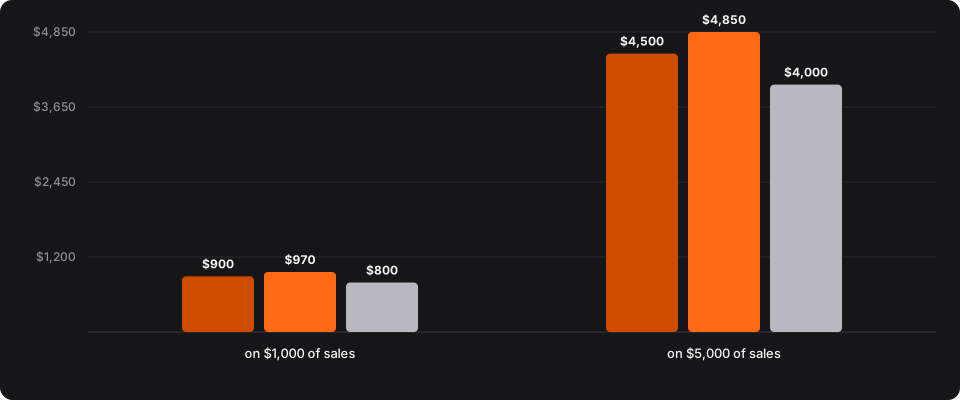
- Creator Link Studio Creator (10%)
- Creator Link Studio Studio (3%)
- OnlyFans
What you keep after the platform fee.
- Creator Link Studio Creator (10%): you keep $900 on $1,000, $4,500 on $5,000.
- Creator Link Studio Studio (3%): you keep $970 on $1,000, $4,850 on $5,000.
- OnlyFans: you keep $800 on $1,000, $4,000 on $5,000.
Hypothetical round sums. OnlyFans' rate is the figure in its own terms of service, linked in the row; our rows are the share of sales alone.
Which Other Comparisons Are Worth Reading?
Platforms of the same kind are compared in Creator Link Studio vs Fanvue, Creator Link Studio vs Fansly. Every platform sits side by side in best creator monetization platforms.
Related Guides
- How to choose an OnlyFans alternative, then move
- An OnlyFans alternative is a sideways move, an all-in-one creator page or a stack you build yourself. Compare the three on what you can sell, what each keeps from a sale, and how money reaches your bank.
- Online creator platform: pick one in 5 steps
- An online creator platform is where your page, your offers and your payouts meet. Work five steps in the order a launch actually happens, instead of ranking logos.
- How to compare creator platform pricing
- Take rates, monthly plan charges and the tools you still pay for rarely point at the same answer. Work through all three comparison methods in order, with one hypothetical page carried through the arithmetic.
Our own side is documented once, on the features, pricing and payouts pages, rather than repeated on each comparison.
Whichever page collects the money, the income is yours to report: the IRS self-employed individuals tax center explains estimated payments, and the IRS page on Form 1099-K explains what a payment processor reports about your sales.
Frequently Asked Questions
How much does OnlyFans take from creators?
OnlyFans takes 20% of each Fan Payment, deducted before the creator's earnings are credited, under its own terms of service.
How do OnlyFans payouts work?
Creators are reported to be paid by bank transfer or e-wallet after a holding period of about 7 days.
Can I export my OnlyFans subscriber list?
OnlyFans does not publish whether creators can export their subscriber list.
Can I use Creator Link Studio and OnlyFans at the same time?
Yes. Running both for a full billing cycle is the safe way to move. Keep posting on OnlyFans, add the new address to every bio and pinned post, and give the new page something OnlyFans cannot sell so fans have a reason to follow.
Try It Alongside OnlyFans.
Keep your OnlyFans page live while you set up; fans move when the new page gives them a reason.