
Best Creator Monetization Platforms in 2026
A creator monetization platform is a service that lets you charge fans for content, memberships or services and pays you out. There is no single best one; there is the best fit for how you sell. This guide compares the main options on fee, what you can sell, payouts, social publishing and ownership. We build Creator Link Studio, and we say so where it matters.
Platform Fees
What each platform keeps from your sales.

How Do You Judge a Creator Platform?
Fee
Subscription platforms keep about 20%. Link-in-bio tools keep 0% to 12% of sales, and their monthly prices are a separate line. Creator Link Studio takes 10% on Creator, 3% on Studio, and its plan prices are a separate monthly line.
What You Can Sell
Subscriptions only, or also pay-per-view, bundles, services and events.
Where Your Fans Are
A platform that publishes to your socials brings people in; one that does not makes you do it by hand.
Ownership and Payouts
Can you export your audience and media if you leave, and how long is the payout hold?
All Platforms at a Glance
One line per platform. Open a comparison for payouts, what you can sell, social publishing and audience export, each with its source.
| Platform | Kind | Fee | |
|---|---|---|---|
| Creator Link Studio | Creator platform | 10% on Creator, 3% on Studio (Free cannot sell). | See features |
| Fanvue | Subscription platform | 20% of gross revenue. | Compare |
| OnlyFans | Subscription platform | 20% of each Fan Payment. | Compare |
| Fansly | Subscription platform | 20% platform fee. | Compare |
| Patreon | Memberships and tips | 10% platform fee, plus processing. | Compare |
| Ko-fi | Memberships and tips | 0% on one-time tips, 5% on the rest. | Compare |
| Linktree | Link-in-bio storefront | 0% to 12% of sales (plans $0 to $35/mo). | Compare |
| Beacons | Link-in-bio storefront | 0% or 9% of sales (plans $0 to $100/mo). | Compare |
| Stan Store | Link-in-bio storefront | $29 or $99/mo, no transaction fee. | Compare |
Last checked on September 25, 2026 by the Creator Link Studio team. Figures come from each platform's own pricing, help or legal pages, linked and dated on its comparison page. Where a platform blocks automated access we use published reporting and label it "reported". We build Creator Link Studio, so read our row with that in mind.
Leaving one platform in particular? See the OnlyFans alternatives, Fanvue alternatives, Patreon alternatives and Linktree alternatives lists.
Which Platform Suits Which Creator?
Subscription Platforms
Paid subscriptions, pay-per-view and messages inside the platform's own app.
Fanvue
Subscription creators, including AI-generated creator accounts, who want built-in AI voice and analytics tools.
Compare with FanvueOnlyFans
Subscription creators who want to sell to fans inside one large, established platform using subscriptions, tips and pay-per-view.
Compare with OnlyFansFansly
Subscription creators, including adult creators, who want an 80/20 split and in-platform discovery through a For You feed.
Compare with FanslyMemberships and Tips
Recurring support tiers, tips and small shops for podcasters, writers and artists.
Patreon
Creators who publish regularly, such as video makers, podcasters and writers, and want paid membership tiers with digital products and community chats in one place.
Compare with PatreonKo-fi
Artists, writers, musicians and streamers who want to take tips, commissions and shop sales with low fees and instant payment to their own account.
Compare with Ko-fiLink-In-Bio Storefronts
A page for your bio link that sells digital products, courses or bookings.
Linktree
Creators who mainly need a simple, widely recognized link page with optional digital product sales and social scheduling.
Compare with LinktreeBeacons
Creators who want a store, email marketing and a brand-deal media kit in one tool, and who do brand partnerships.
Compare with BeaconsStan Store
Coaches and educators who sell courses, bookings and digital products and prefer a flat monthly fee with no transaction fee.
Compare with Stan StoreCreator Link Studio
For creators who sell more than subscriptions from one page: pay-per-view, bundles, services and events. They publish to all their socials from one studio and want a lower share on the higher plan.
How Should You Read the Fee Column?
The fee column mixes two shapes of pricing, and the shape matters more than the number. Subscription platforms take a share of every sale and charge no plan price: Fanvue keeps 20% of gross revenue (source, checked September 21, 2026), Fansly keeps 20% (source) and OnlyFans deducts 20% of each fan payment under its terms (source, checked October 11, 2026). Storefronts invert it: Stan Store charges $29 or $99 a month and no transaction fee (source), Beacons 0% on Creator Plus at $30 a month and 9% on its free plan (source), Linktree 12% on Free down to 0% on Premium at $35 (source).
Patreon and Ko-fi sit between. Patreon charges 10% for pages published after August 4, 2025, plus processing, conversion and payout fees (source); Ko-fi Free charges nothing on one-time tips and 5% on memberships, shop sales and commissions (source). Creator Link Studio's platform fee is 10% on Creator, 3% on Studio. Its monthly plan price is a separate line, and card processing is separate as everywhere.
So read the share and the monthly price as two separate columns. Ko-fi and the free storefront tiers charge no monthly price. The subscription platforms keep about 20% of each sale and charge no monthly price either. The fee table further down runs two sales volumes through every platform with a published rate, on the percentage alone.
How Do Payout Terms Differ?
Ko-fi pays immediately into the creator's own connected payment account, with no schedule and no minimum (source). Stan Store pays the full available balance, minimum $10, in 24 to 48 hours once sales have finished processing (source). Linktree and Beacons settle store sales to the connected account on a schedule the creator chooses (source; source).
The subscription platforms hold money longer. Fanvue's standard pending period is seven days and can extend to twenty-eight (source); Fansly pays amounts above $20 as often as you like, typically within three business days by bank transfer (source); OnlyFans is reported to pay after a holding period of about seven days (source (third-party reporting)). Patreon applies a five-day hold after a payout method is added and keeps one-time purchases pending up to seven days (source).
Creator Link Studio pays on request from a $25 balance to your bank, with no platform hold on content, membership or service sales; earnings from an event release after the event has taken place. One balance covers memberships, unlocks, bundles, services and tickets, so there is one number to watch rather than one per product.
Who Owns the Audience When You Leave?
Patreon exports the member list with emails as a CSV (source); Ko-fi exports supporter and member lists (source); Linktree exports contacts on every plan (source); Beacons exports from its Audience Manager (source); Stan Store exports customer and order data from the Income tab (source). OnlyFans, Fanvue and Fansly do not publish an export.
That line divides the list more sharply than the fee does. A creator on a platform with no export rebuilds the audience through messages and bios on every move; a creator with a CSV emails it. Creator Link Studio exports the audience list and your media at any time, and the inbox can broadcast to segments of that audience with paid media attached, which is how a list becomes income rather than a file.
Publishing follows the same line. Linktree's planner posts to six networks and the rest of the list leaves social posting to you; Creator Link Studio's studio publishes each post to ten platforms with the paid version behind the lock on your page, so the promotion and the sale are one action.
A Worked Scenario: the Same Creator on Three Platforms
Take a creator with $2,800 a month across memberships and single purchases, round and hypothetical. On a 20% subscription platform the platform keeps $560 and $2,240 is left before card processing. On Stan Store Creator the platform takes no share of sales, so the $2,800 is left before card processing, and its $29 a month is a separate line (source).
On Creator Link Studio the same $2,800 works like this: the Creator plan keeps 10%, $280, leaving $2,520; the Studio plan keeps 3%, $84, leaving $2,716. Card processing is charged separately on every option above. The monthly plan prices are a separate line, shown on the pricing page, not in these figures.
The plan also sets the included AI credits, storage and AI influencers, which are listed on the pricing page.
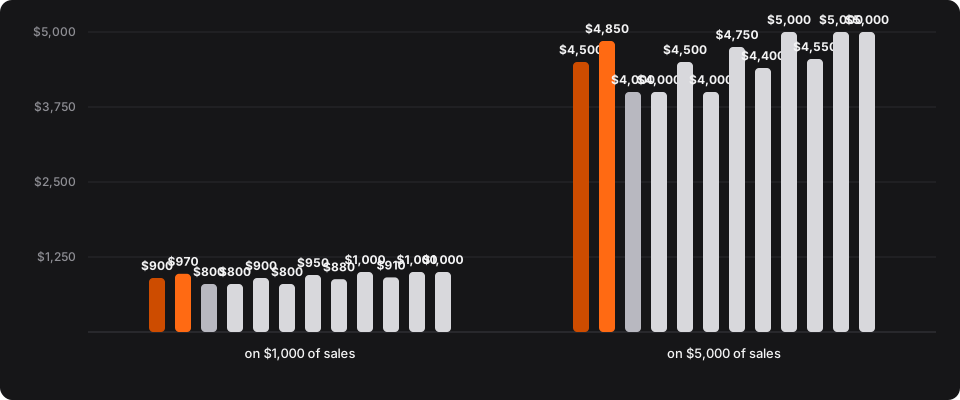
What Does the Fee Come to on Example Sales?
On $1,000 of sales in a month, Fanvue keeps $200 and Creator Link Studio's Creator plan keeps $100. The figures are the platform percentage only; monthly plan prices, ours and theirs, are separate and listed where each plan is sold. Card processing is charged separately on every option in the table.
| Option | Fee on $1,000 of sales | You keep | Fee on $5,000 of sales | You keep |
|---|---|---|---|---|
| Creator Link Studio Creator (10%) | $100 (10%). | $900. | $500 (10%). | $4,500. |
| Creator Link Studio Studio (3%) | $30 (3%). | $970. | $150 (3%). | $4,850. |
| Fanvue source | $200 (20%). | $800. | $1,000 (20%). | $4,000. |
| OnlyFans source | $200 (20%). | $800. | $1,000 (20%). | $4,000. |
| Patreon (pages published after August 4, 2025) source | $100 (10%). | $900. | $500 (10%). | $4,500. |
| Fansly source | $200 (20%). | $800. | $1,000 (20%). | $4,000. |
| Ko-fi Free (memberships, shop, commissions) source | $50 (5%). | $950. | $250 (5%). | $4,750. |
| Linktree Free (12% on sales) source | $120 (12%). | $880. | $600 (12%). | $4,400. |
| Linktree Premium ($35/mo, 0% on sales) source | $0 (0%). | $1,000. | $0 (0%). | $5,000. |
| Beacons Free (9% seller fee) source | $90 (9%). | $910. | $450 (9%). | $4,550. |
| Beacons Creator Plus ($30/mo, 0% seller fee) source | $0 (0%). | $1,000. | $0 (0%). | $5,000. |
| Stan Store Creator ($29/mo, no transaction fee) source | $0 (0%). | $1,000. | $0 (0%). | $5,000. |
- Creator Link Studio Creator (10%)
- Creator Link Studio Studio (3%)
- Fanvue
- OnlyFans
- Patreon (pages published after August 4, 2025)
- Fansly
- Ko-fi Free (memberships, shop, commissions)
- Linktree Free (12% on sales)
- Linktree Premium ($35/mo, 0% on sales)
- Beacons Free (9% seller fee)
- Beacons Creator Plus ($30/mo, 0% seller fee)
- Stan Store Creator ($29/mo, no transaction fee)
What you keep after the platform fee.
- Creator Link Studio Creator (10%): you keep $900 on $1,000, $4,500 on $5,000.
- Creator Link Studio Studio (3%): you keep $970 on $1,000, $4,850 on $5,000.
- Fanvue: you keep $800 on $1,000, $4,000 on $5,000.
- OnlyFans: you keep $800 on $1,000, $4,000 on $5,000.
- Patreon (pages published after August 4, 2025): you keep $900 on $1,000, $4,500 on $5,000.
- Fansly: you keep $800 on $1,000, $4,000 on $5,000.
- Ko-fi Free (memberships, shop, commissions): you keep $950 on $1,000, $4,750 on $5,000.
- Linktree Free (12% on sales): you keep $880 on $1,000, $4,400 on $5,000.
- Linktree Premium ($35/mo, 0% on sales): you keep $1,000 on $1,000, $5,000 on $5,000.
- Beacons Free (9% seller fee): you keep $910 on $1,000, $4,550 on $5,000.
- Beacons Creator Plus ($30/mo, 0% seller fee): you keep $1,000 on $1,000, $5,000 on $5,000.
- Stan Store Creator ($29/mo, no transaction fee): you keep $1,000 on $1,000, $5,000 on $5,000.
Round numbers for the arithmetic, not earnings figures. Competitor rates come from the linked page on each platform's own site. Monthly plan prices are not in these figures.
Related Guides
- Best Place to Sell Photos Online for Free by Profile
- There is no single best place to sell photos online for free. The right platform depends on your audience, your portfolio and how you sell.
- Online creator platform: pick one in 5 steps
- An online creator platform is where your page, your offers and your payouts meet. Work five steps in the order a launch actually happens, instead of ranking logos.
- How to compare creator platform pricing
- Take rates, monthly plan charges and the tools you still pay for rarely point at the same answer. Work through all three comparison methods in order, with one hypothetical page carried through the arithmetic.
- Leaving Fanvue? 3 alternatives compared on fees and payouts
- Three routes lead away from a subscription site: rebuild where you are, move to an all-in-one creator platform, or stitch a link page to separate tools. Compare them on fees, product range, AI limits, payouts and export.
Everything about Creator Link Studio itself lives on its own pages: features, pricing and limits and payouts.
Two rules sit outside every platform on this page. Creator income is self-employment income, and the IRS self-employed individuals tax center explains the estimated payments; a sponsored post needs a disclosure, which the FTC's Disclosures 101 for influencers sets out.
Frequently Asked Questions
Which creator platform takes the lowest fee?
It depends on what you sell. Ko-fi Free charges no service fee on one-time tips and 5% on memberships and shop sales. Stan Store charges no transaction fee but costs $29 or $99 a month. Subscription platforms like OnlyFans and Fansly keep about 20%.
Creator Link Studio takes 10% on Creator, 3% on Studio (Free cannot sell). Card processing fees apply on top almost everywhere.
Which platforms publish to my social accounts?
Linktree's Social Planner auto-posts to Instagram, TikTok, Facebook, LinkedIn, Pinterest and YouTube Shorts. Creator Link Studio publishes to ten platforms from one studio. Patreon, Ko-fi, Fansly, OnlyFans, Beacons and Stan Store do not publish automatic posting to your social accounts.
Can I sell memberships and pay-per-view on the same platform?
Subscription platforms such as OnlyFans and Fansly combine subscriptions with pay-per-view posts and messages. Patreon combines memberships with digital products. Creator Link Studio sells memberships, pay-per-view posts, bundles, services and events from one page.
Can I export my audience if I leave?
Patreon, Ko-fi, Linktree, Beacons and Stan Store all let you download your members, supporters or customers as a CSV. OnlyFans and Fansly do not publish an export. Creator Link Studio: Export your audience and media any time.
Can I use more than one platform?
Yes. Many creators keep a subscription platform, a link-in-bio page and a membership platform at once. The simplest setup is one page that links or sells everything, with your socials pointing to it.
See It with Your Own Page.
Memberships, pay-per-view, services and events, with payouts to your bank.